Dangerous Errors
Podcast Posts Presentations Synthwave About
  • RSA Europe 2011 Oct 12, 2011
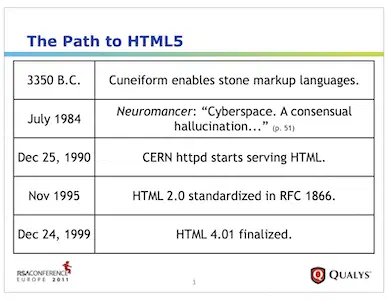
    The Path to HTML5

    Here are the slides for my presentation at RSA 2011 Europe. The topic was HTML5 with an emphasis on distinguishing between HTML5 features that may present vulns vs. how HTML5 would simply be leveraged as part of older exploits.

    It also touches on broader aspects of web security such as design vs. implementation issues, the impact of mobile devices, and how using frameworks can improve security -- as long as the frameworks themselves are good.

    I iterated on this content later in 2012.

  • Will the Real APT Please Stand Up? Jun 16, 2011
    The Bogey-Owl

    The Advanced Persistent Threat (APT) is competing with Cyberwar for security word of the year. It would have been nice if we had given other important words like HTTPS or prepared statements their chance to catch enough collective attention to drive security fixes. Alas, we still deal with these fundamental security problems due to Advanced Persistent Ignorance.

    It’s not wrong to seek out APT examples. It helps to have an idea about their nature, but we must be careful about seeing the APT boogeyman everywhere.

    Threats have agency. They are persons (or natural events like earthquakes and tsunamis) that take action against your assets (like customer information or encryption keys). An XSS vuln in an email site isn’t a threat -- the person trying to hijack an account with it is. With this in mind, the term APT helpfully self-describes two important properties of a threat:

    • it's persistent
    • it's advanced

    Persistence is uncomplicated. The threat actor has a continuous focus on the target. This doesn’t mean around-the-clock port scanning just waiting for an interesting port to appear. It means active collection of data about the target as well as development of tools, techniques, and plans once a compromise is attained. Persistent implies patience in searching for “simple” vulns as much as enumerating resources vulnerable to more sophisticated exploits.

    A random hacker joyriding the internet with sqlmap or metasploit be persistent, but the persistence is geared towards finding any instance of a vuln rather than finding one instance of a vuln in a specific target. It’s the difference between a creep stalking his ex versus a creep hanging out in a bar waiting for someone to get really drunk.

    The advanced aspect of a threat leads to more confusion than its persistent aspect. An advanced threat may still exploit simple vulns like SQL injection. The advanced nature need not even be the nature of the exploit (like using sqlmap). What may be advanced is how they leverage the exploit. Remember, the threat actor most likely wants to do more than grab passwords from a database. With passwords in hand it’s possible to reach deeper into the target network, steal information, cause disruption, and establish more permanent access.

    Stolen passwords are one of the easiest backdoors and the most difficult to detect. Several months ago RSA systems were hacked. Enough information was allegedly stolen that observers at the time imagined it would enable attackers to spoof or otherwise attack SecurID tokens and authentication schemes.

    Now it seems those expectations have been met with not one, but two major defense contractors reporting breaches that apparently used SecurID as a vector.

    I don’t want you to leave without a good understanding of what an insidious threat looks like. Let’s turn to the metaphor and allegory of television influenced by the Cold War.

    Specifically, The Twilight Zone season 2, episode 28, "Will the Real Martian Please Stand Up" written by the show’s creator, Rod Serling.

    Spoilers ahead. Watch the episode before reading further. It’ll be 25 minutes of entertainment you won’t regret.

    The set-up of the episode is that a Sheriff and his deputy find possible evidence of a crashed UFO, along with very human-like footprints leading from the forested crash site into town.

    The two men follow the tracks to a diner where a bus is parked out front. They enter the diner and ask if anyone’s seen someone suspicious. You know, like an alien. The bus driver explains the bus is delayed by the snowy weather and they had just recently stopped at this diner. The lawmen scan the room, "Know how many you had?"

    "Six."

    In addition to the driver and the diner’s counterman, Haley, there are seven people in the diner. Two couples, a dandy in a fedora, an old man, and a woman. Ha! Someone's a Martian in disguise!

    What follows are questions, doubt, confusion, and a jukebox. With no clear evidence of who the Martian may be, the lawmen reluctantly give up and allow everyone to depart. The passengers reload the bus1. The sheriff and his deputy leave. The bus drives away.

    But this is the Twilight Zone. It wouldn’t leave you with a such a simple parable of paranoia; there’s always a catch.

    The man in the fedora and overcoat, Mr. Ross, returns to the diner. He laments that the bus didn't make it across the bridge. ("Kerplunk. Right into the river.")

    Dismayed, he sits down at the counter, cradling a cup of coffee in his left hand. The next instant, with marvelous understatement, he pulls a pack of cigarettes from his overcoat and extracts a cigarette -- using a third hand to retrieve some matches.

    We Martians (he explains) are looking for a nice remote, pleasant spot to start colonizing Earth.

    Oh, but we’re not finished. Haley nods at Mr. Ross' story. You see, the inhabitants of Venus thought the same thing. In fact, they've already intercepted and blocked the Ross’ Martian friends in order to establish a colony of their own.

    Haley smiles, pushing back his diner hat to reveal a third eye in his forehead.

    That, my friends, is an advanced persistent threat!


    1. The server rings up their bills, charging one of them $1.40 for 14 cups of coffee. I'm not sure which is more astonishing -- drinking 14 cups or paying 10 cents for each one. ↩︎

  • Klingon, Quenya, or Sindarin? Jun 1, 2011

    I finished the original May 2011 version of this article and its linguistic metaphor a few days before coming across an article that described research showing the feasibility of identifying language patterns over encrypted channels.

    One goal of an encryption algorithm is to create diffusion of the original content in order to camouflage that content's structure. For example, diffusion applied to a long English text, say one of Iain M. Bank's novels would reduce the frequency of the letter e from the most common one to (ideally) an equally common frequency within the encrypted output (aka ciphertext).

    The confusion property of an encryption algorithm would obscure meaning with something like replacing every letter e with the letter z, but that wouldn't affect how frequently the letter appears -- hence the need for diffusion.

    Check out the Communication Theory of Secrecy Systems by Claude Shannon for the original (and far superior) explanation of these concepts.

    There have been analyses of SSL and SSH that demonstrated how it was possible to infer the length of encrypted content (which therefore might reveal the length of a password even if the content is not known) or guess whether content was HTML or an image. The Skype analysis is a fantastic example of looking for structure within an encrypted stream and making inferences from those observations.

  • A Spirited Peek into ViewState, Part II May 25, 2011

    Our previous article started with an overview of the ViewState object. It showed some basic reverse engineering techniques to start deconstructing the contents embedded within the object. This article broaches the technical aspects of implementing a parser to automatically pull the ViewState apart.

    We’ll start with a JavaScript example. The code implements a procedural design rather than an object-oriented one. Regardless of your design preference, JavaScript enables either method.

    The ViewState must be decoded from Base64 into an array of bytes. We’ll take advantage of browsers’ native atob and btoa functions rather than re-implement the Base64 routines in JavaScript. Second, we’ll use the proposed [ArrayBuffer] data type in favor of JavaScript’s String or Array objects to store the unencoded ViewState. Using ArrayBuffer isn’t necessary, but it provides a more correct data type for dealing with 8-bit values.

    Here’s a function to turn the Base64 ViewState into an array of bytes in preparation of parsing:

    function analyzeViewState(input) {
        var inputLength = input.length;
        var rawViewState = atob(input);
        var rawViewStateLength = rawViewState.length;
        var vsBytes = new Uint8Array(ArrayBuffer(rawViewStateLength));
    
        for(i = 0; i < rawViewStateLength; ++i) {
            vsBytes[i] = rawViewState.charCodeAt(i);
        }
    
        if(vsBytes[0] == 0xff & vsBytes[1] == 0x01) { // okay to continue, we recognize this version
            var i = 2;
            while(i < vsBytes.length) {
                i = parse(vsBytes, i);
            }
        }
        else {
            document.writeln("unknown format");
        }
    }
    

    The parse function will basically be a large switch statement. It takes a ViewState buffer, the current position in the buffer to analyze (think of this as a cursor), and returns the next position. The skeleton looks like this:

    function parse(bytes, pos) {
        switch(bytes[pos]) {
            case 0x64: // EMPTY
                ++pos;
                break;
            default: // unknown byte
                ++pos;
                break;
        }
        return pos;
    }
    

    If you recall from the previous article, strings were the first complex object we ran into. But parsing a string also required knowing how to parse numbers. This is the function we’ll use to parse numeric values. The functional approach coded us into a bit of a corner because the return value needs to be an array that contains the decoded number as an unsigned integer and the next position to parse (we need to know the position in order to move the cursor along the buffer):

    function parseUInteger(bytes, pos) {
        var n = parseInt(bytes[pos]) & 0x7f;
    
        if(parseInt(bytes[pos]) > 0x7f) {
            ++pos;
            var m = (parseInt(bytes[pos]) & 0x7f) << 7;
            n += m;
    
            if(parseInt(bytes[pos]) > 0x7f) {
                ++pos;
                var m = (parseInt(bytes[pos]) & 0x7f) << 14;
                n += m;
            }
        }
    
        ++pos;
    
        return [n, pos];
    }
    

    With the numeric parser created we can update the switch statement in the parse function:

    function parse(bytes, pos) {
        var r = [0, 0];
        switch(bytes[pos]) {
            case 0x02:
                ++pos;
                r = parseUInteger(bytes, pos);
                pos = r[1];
                document.writeln("number: " + r[0]);
                break;
            ...
    

    Next up is parsing strings. We know the format is 0x05, followed by the length, followed by the “length” number of bytes. Now add this to the switch statement:

    switch(bytes[pos]) {
        ...
        case 0x05:
            ++pos;
            r = parseUInteger(bytes, pos);
            var size = r[0];
            pos = r[1];
            var s = parseString(bytes, pos, size);
            pos += size;
            document.writeln("string (" + size + "): " +
                s.replace(/&/g,'&amp;').replace(/</g,'&lt;').replace(/>/g,'&gt;'));
            break;
        ...
    

    The parseString function will handle the extraction of characters. Since we know the length of the string beforehand it’s unnecessary for parseStringto return the cursor’s next position:

    function parseString(bytes, pos, size) {
        var s = new String("");
    
        for(var i = pos; i < pos + size; ++i) {
            s += String.fromCharCode(parseInt(bytes[i], 10));
        }
    
        return s;
    }
    

    We’ll cover two more types of objects before moving on to an alternate parser. A common data type is the Pair. As you’ve likely guessed, this is an object that contains two objects. It could also be called a tuple that has two members. The Pair is easy to create. It also introduces recursion. Update the switch statement with this:

    switch(bytes[pos]) {
        ...
        case 0x0f:
            ++pos;
            document.writeln("pair");
            pos = parse(bytes, pos); // member 1
            pos = parse(bytes, pos); // member 2
            break;
        ...
    

    More containers quickly fall into place. Here’s another that, like strings, declares its size, but unlike strings may contain any kind of object:

    switch(bytes[pos]) {
        ...
        case 0x16:
            ++pos;
            r = parseUInteger(bytes, pos);
            var size = r[0];
            pos = r[1];
            document.writeln("array of objects (" + size + ")");
            for(var i = 0; i < size; ++i) {
                pos = parse(bytes, pos);
            }
            break;
        ...
    

    From here you should have an idea of how to expand the switch statement to cover more and more objects. You can use this page as a reference. JavaScript’s capabilities exceed the simple functional approach of these previous examples; it can handle far more robust methods and error handling. Instead of embellishing that code, let’s turn our text editor towards a different language: C++.

    Diving into C++ requires us to start thinking about object-oriented solutions to the parser, or at least concepts like STL containers and iterators. You could very easily turn the previous JavaScript example into C++ code, but you’d really just be using a C++ compiler against plain C code rather than taking advantage of the language.

    In fact, we’re going to take a giant leap into the Boost.Spirit library. The Spirit library provides a way to create powerful parsers using clear syntax. (Relatively clear despite one’s first impressions.) In Spirit parlance, our parser will be a grammar composed of rules. A rule will have attributes related to the data type is produces. Optionally, a rule may have an action that executes arbitrary code.

    Enough delay. Let’s animate the skeleton of our new grammar. The magic of template meta-programming makes the following struct valid and versatile. Its why’s and wherefore’s may be inscrutable at the moment; however, the gist of the parser should be clear and, if you’ll forgive some exaltation, quite elegant in terms of C++:

    template <typename Iterator> struct Grammar : boost::spirit::qi::grammar<Iterator> {
        Grammar() : Grammar::base_type(start) {
            using boost::spirit::qi::byte_;
    
            empty = byte_(0x64);
            object = empty | pair;
            pair = byte_(0x0f) >> object >> object;
            version = byte_(0xff) >> byte_(0x01);
            start = version // must start with recognized version
                >> +object; // contains one or more objects
        }
    
        qi::rule<Iterator> empty, object, pair, start, version;
    };
    

    We haven’t put all the pieces together for a complete program. We’ll put some more flesh on the grammar before unleashing a compiler on it. One of the cool things about Spirit is that you can compose grammars from other grammars. Here’s how we’ll interpret strings. There’s another rule with yet another grammar we need to write, but the details are skipped. All it does it parse a number (see the JavaScript above) and expose the value as the attribute of the UInteger32 rule.1 The following example introduces two new concepts, local variables and actions:

    template <typename Iterator> struct String : boost::spirit::qi::grammar<Iterator, qi::locals<unsigned> > {
        String() : String::base_type(start) {
            using boost::spirit::qi::byte_;
            using boost::spirit::qi::omit;
            using namespace boost::spirit::qi::labels;
    
            start = omit[ (byte_(0x05) | byte_(0x1e))
                >> length[ _a = _1 ] ]
                >> repeat(_a)[byte_] ;
        }
    
        UInteger32<Iterator> length; qi::rule<Iterator, qi::locals<unsigned> > start;
    };
    

    The action associated with the length rule is in square brackets. (Not to be confused with the square brackets that are part of the repeat syntax.) Remember that length exposes a numeric attribute, specifically an unsigned integer. The attribute of a rule can be captured with the _1 placeholder. The local variable for this grammar is captured with _a. Local variables can be passed into, manipulated, and accessed by other rules in the grammar. In the previous example, the value of length is set to _a via simple assignment in the action. Next, the repeat parser takes the value of _a to build the “string” stored in the ViewState. The omit parser keeps the extraneous bytes out of the string.

    Now we can put the String parser into the original grammar by adding two lines of code (highlighted in bold). That this step is so trivial speaks volumes about the extensibility of Spirit:

        ...
        object = empty | my_string | pair;
        ...
        start = version // must start with recognized version
            >> +object; // contains one or more objects
    }
    
    String<Iterator> my_string;
    qi::rule<Iterator> empty, ...
    

    The String grammar introduced the repeat parser. We’ll use that parser again in the grammar for interpreting ViewState containers. At this point the growth of the grammar accelerates quickly because we have good building blocks in place:

        ...
        using boost::spirit::qi::byte_;
        using boost::spirit::qi::repeat;
    
        container = byte_(0x16)
            >> length [ _a = _1 ]
            >> repeat(_a)[object] ;
    
        empty = byte_(0x64);
    
        object = empty | my_string | pair;
        ...
    }
    
    String<Iterator> my_string;
    UInteger32<Iterator> length;
    qi::rule<Iterator, qi::locals<unsigned> > container;
    qi::rule<Iterator> empty, ...
    

    This has been a whirlwind introduction to Spirit. If you got lost along the way, don’t worry. Try going through the examples in Spirit’s documentation. Then, re-read this article to see if the concepts make more sense. I’ll also make the sample code available to help get you started.

    There will be a few surprises as you experiment with building Spirit grammars. For one, you’ll notice that compilation takes an unexpectedly long time for just a dozen or so lines of code. This is due to Spirit’s template-heavy techniques. While the duration contrasts with “normal” compile times for small programs, I find it a welcome trade-off considering the flexibility Spirit provides.

    Another surprise will be error messages. Misplace a semi-colon or confuse an attribute and you’ll be greeted with lines and lines of error messages. Usually, the last message provides a hint of the problem. Experience is the best teacher here. I could go on about hints for reading error messages, but that would be an article on its own.

    Between compile times and error messages, debugging rules might seem a daunting task. However, the creators of Spirit have your interests in mind. They’ve created two very useful aids to debugging: naming rules and the debug parser. The following example shows how these are applied to the String grammar. Once again, the change is easy to implement:

        ...
        start = omit[ (byte_(0x05) | byte_(0x1e))
            >> length[ _a = _1 ] ]
            >> repeat(_a)[byte_] ;
    }
    
    start.name(“String”); // Human readable name for the rule
    debug(start); // Produce XML output of the parser’s activity
    
    UInteger32<Iterator> length;
    qi::rule<Iterator, qi::locals<unsigned> > start;
    };
    

    As a final resource, Boost.Spirit has its own web site with more examples, suggestions, and news on the development of this fantastic library.

    It seems unfair to provide all of these code snippets without a complete code listing for reference or download. Plus, I suspect formatting restrictions may make it more difficult to read. Watch for updates to this article that provide both full code samples and more readable layout. Hopefully, there was enough information to get you started on creating your own parsers for ViewState or other objects.

    In the next article in this series we’ll shift from parsing ViewState to attacking it and using it to carry our attacks past input validation filters into the belly of the web app.


    1. Spirit has pre-built parsers for many data types, including different types of integers. We need to use custom ones to deal with ViewState’s numeric serialization. ↩︎

  • A Spirited Peek into ViewState, Part I May 13, 2011

    The security pitfalls of the .NET ViewState object have been well-known since its introduction in 2002. The worst mistake is for a developer to treat the object as a black box that will be controlled by the web server and opaque to the end user. Before diving into ViewState security problems we need to explore its internals. This article digs into more technical language1 than others on this site and focuses on reverse engineering the ViewState. Subsequent articles will cover security. To invoke Bette Davis: “Fasten your seat belts. It’s going to be a bumpy night.”2

    The ViewState enables developers to capture transient values of a page, form, or server variables within a hidden form field. The ability to track the “state of the view” (think model-view-controller) within a web page alleviates burdensome server-side state management for situations like re-populating fields during multi-step form submissions, or catching simple form entry errors before the server must get involved in their processing. (MSDN has several articles that explain this in more detail.)

    This serialization of a page’s state involves objects like numbers, strings, arrays, and controls. These “objects” are not just conceptual. The serialization process encodes .NET objects (in the programming sense) into a sequence of bytes in order to take it out of the server’s memory, transfer it inside the web page, and reconstitute it when the browser submits the form.

    Our venture into the belly of the ViewState starts with a blackbox perspective that doesn’t rely on any prior knowledge of the serialization process or content. The exploration doesn’t have to begin this way. You could write .NET introspection code or dive into ViewState-related areas of the Mono project for hints on unwrapping this object. I merely chose this approach as an intellectual challenge because the technique can be generalized to analyzing any unknown binary content.

    The first step is trivial and obvious: decode from Base64. As we’re about to see, the ViewState contains bytes values forbidden from touching the network via an HTTP request. The data must be encoded with Base64 to ensure survival during the round trip from server to browser. If a command-line pydoc base64 or perldoc MIME::Base64 doesn’t help you get started, a simple web search will turn up several ways to decode from Base64. Here’s the beginning of an encoded ViewState:

    /wEPDwUJNzIwNzAyODk0D2...
    

    Now we’ll break out the xxd command to examine the decoded ViewState. One of the easiest steps in reverse engineering is to look for strings because our brains evolved to pick out important words like “donut”, “Password”, and “zombies!” quickly. The following line shows the first 16 bytes that xxd produces from the previous example. To the right of the bytes xxd has written matching ASCII characters for printable values -- in this case the string 720702894.

    0000000: ff01 0f0f 0509 3732 3037 3032 3839 340f ......720702894.
    

    Strings have a little more complexity than this example conveys. In an English-centric world words are nicely grouped into arrays of ASCII characters. This means that a programming language like C treats strings as a sequence of bytes followed by a NULL. In this way a program can figure out that the bytes 0x627261696e7300 represent a six-letter word by starting at the string’s declared beginning and stopping at the first NULL (0x00). I’m going to do some hand-waving about the nuances of characters, code points, character encodings and their affect on “strings” as I’ve just described. For the purpose of investigating ViewState we only need to know that strings are not (or are very rarely) NULL-terminated.

    Take another look at the decoded example sequence. I’ve highlighted the bytes that correspond to our target string. As you can see, the byte following 720702894 is 0x0f -- not a NULL. Plus, 0x0f appears twice before the string starts, which implies it has some other meaning:

    ff01 0f0f 0509 **3732 3037 3032 3839 340f ......720702894.
    

    The lack of a common terminator indicates that the ViewState serializer employs some other hint to distinguish a string from a number or other type of data. The most common device in data structures or protocols like this is a length delimiter. If we examine the byte before our visually detected string, we’ll see a value that coincidentally matches its length. Count the characters in 720702894.

    ff01 0f0f 0509 3732 3037 3032 3839 340f ......720702894.
    

    Congratulations to anyone who immediately wondered if ViewState strings are limited to 255 characters (the maximum value of a byte). ViewState numbers are a trickier beast to handle. It’s important to figure these out now because we’ll need to apply them to other containers like arrays.3 Here’s an example of numbers and their corresponding ViewState serialization. We need to examine them on the bit level to deduce the encoding scheme.

    Decimal   Hex     Binary  
    1         01      00000001  
    9         09      00001001  
    128       8001    10000000 00000001  
    655321    09ffd9  11011001 11111111 0100111
    

    The important hint is the transition from values below 128 to those above. Seven bits of each byte are used for the number. The high bit tells the parser, “Include the next byte as part of this numeric value.”

    LSB           MSB  
    10000110 00101011
    

    Here’s the same number with the unused “high” bit removed and reordered with the most significant bits first.

    MSB   ...   LSB  
    0101011 0000110 (5510, 0x1586)
    

    Now that we’ve figured out how to pick out strings and their length it’s time to start looking for ways to identify different objects. Since we have strings on the mind, let’s walk back along the ViewState to the byte before the length field. We see 0x05.

    ff01 0f0f 0509 3732 3037 3032 3839 340f ......720702894.
    

    That’s the first clue that 0x05 identifies a string. We confirm this by examining other suspected strings and walking the ViewState until we find a length byte (or bytes) preceded by the expected identifier. There’s a resounding correlation until we find a series of strings back-to-back that lack the 0x05 identifier. Suddenly, we’re faced with an unknown container. Oh dear. Look for the length field for the three strings:

    0000000: 1503 0774 6f70 5f6e 6176 3f68 7474 703a ...top_nav?http:
    0000010: 2f2f 7777 772e 5f5f 5f5f 5f5f 5f2e 636f //www._______.co
    0000020: 6d2f 4162 6f75 7455 732f 436f 6e74 6163 m/AboutUs/Contac
    0000030: 7455 732f 7461 6269 642f 3634 392f 4465 tUs/tabid/649/De
    0000040: 6661 756c 742e 6173 7078 0a43 6f6e 7461 fault.aspx.Conta
    0000050: 6374 2055 73 ct Us
    

    Moving to the first string in this list we see that the preceding byte, 0x03, is a number that luckily matches the amount of strings in our new, unknown object. We peek at the byte before the number and see 0x15. We’ll call this the identifier for a String Array.

    At this point the reverse engineering process is easier if we switch from a completely black box approach to one that references MSDN documentation and output from other tools.

    Two of the most common objects inside a ViewState are Pairs and Triplets. As the name implies, these containers (also called tuples) have two or three members. There’s a catch here, though: They may have empty members. Recall the analysis of numbers. We wondered how upper boundaries (values greater than 255) might be handled, but we didn’t consider the lower bound. How might empty containers be handled? Do they have a length of zero (0x00)? Without diverging too far off course, I’ll provide the hint that NULL strings are 0x658 and the number zero (0) is 0x66.

    The root object of a ViewState is either a Pair or Triplet. Thus, it’s easy to inspect different samples in order to figure out that 0x0f identifies a Pair and 0x10 a Triple. Now we can descend the members to look for other kinds of objects.

    A Pair has two members. This also implies that it doesn’t need a size identifier since there’s no point in encoding “2” for a container that is designed to hold two members. (Likewise “3” for Triplets.) Now examine the ViewState using a recursive descent parser. This basically means that we encounter a byte, update the parsing context based on what the byte signifies, then consume the next byte based on the current context. In practice, this means a sequence of bytes like the following example demonstrates nested Pairs:

    0000000: ff01 0f0f 0509 3732 3037 3032 3839 340f ......720702894.
    0000010: 6416 0666 0f16 021e 0454 6578 7405 793c d..f.....Text.y<
    
    Version
    Pair
     - Member 1: Pair
        - Member 1: String
            “720702894” 
        - Member 2: Pair
           - Member 1: ArrayList (0x16) of 6 elements
               Number 0
               Pair
               ...
           - Member 2: Empty
     - Member 2: Empty
    

    Don’t worry if you finish parsing with 16 or 20 leftover bytes. These correspond to the MD5 or SHA1 hash of the contents. In short, this hash prevents tampering of ViewState data. Recall that the ViewState travels back and forth between the client and server. There are many reasons why the server wants to ensure the integrity of the ViewState data. We’ll explore integrity (hashing), confidentiality (encryption), and other security issues in a future article.

    I haven’t hit every possible control object that might sneak into a ViewState. You can find a NULL-terminated string. You can find RGBA color definitions. And a lot more.

    This was a brief introduction to the ViewState. It’s necessary to understand its basic structure and content before we dive into its security implications. In the next part of this series I’ll expand the analysis to more objects while showing how to use the powerful parsing available from the Boost.Spirit C++ library. We could even dive into JavaScript parsing for those who don’t want to leave the confines of the browser. After that, we’ll look at the security problems due to unexpected ViewState manipulation and the countermeasures for web apps to deploy. In the mean time, I’ll answer questions that pop up in the comments.


    1. More technical, but not rigorously so. Given the desire for brevity, some programming terms like objects, controls, NULL, strings, and numbers (integers signed or unsigned) are thrown about rather casually. ↩︎

    2. All About Eve. https://www.imdb.com/title/tt0042192/ (Then treat yourself to Little Foxes and Whatever Happened to Baby Jane?) ↩︎

    3. I say “other containers” because strings can simply be considered a container of bytes, albeit bytes with a particular meaning and restrictions. ↩︎

1 ... 21 22 23 24 25

Dangerous Errors

  • zombie
  • mutantzombie
  • mutantzombie.bsky.app
  • SecurityWeekly

Cybersecurity and more | © Mike Shema