Dangerous Errors
Podcast Posts Presentations Synthwave About
  • User Agent. Secret Agent. Double Agent. Jan 21, 2013

    We hope our browsers are secure in light of the sites we choose to visit. What we often forget, is whether we are secure in light of the sites our browsers choose to visit.

    Sometimes it's hard to even figure out whose side our browsers are on.

    Browsers act on our behalf, hence the term User Agent. They load HTML from the link we type in the address bar, then retrieve resources defined in that HTML in order to fully render the site. The resources may be obvious, like images, or behind-the-scenes, like CSS that styles the page's layout or JSON messages sent by XmlHttpRequest objects.

    Then there are times when our browsers work on behalf of others, working as a Secret Agent to betray our data. They carry out orders delivered by Cross-Site Request Forgery (CSRF) exploits enabled by the very nature of HTML.

    Part of HTML's success is its capability to aggregate resources from different origins into a single page. Check out the following HTML. It loads a CSS file, JavaScript functions, and two images from different origins, all over HTTPS. None of it violates the Same Origin Policy. Nor is there an issue with loading different origins from different TLS connections.

    <!doctype html>
    <html>
    <head>
    <link href="https://fonts.googleapis.com/css?family=Open+Sans" rel="stylesheet" media="all" type="text/css" />
    <script src="https://ajax.aspnetcdn.com/ajax/jQuery/jquery-1.9.0.min.js"></script>
    <script>$(document).ready(function() { $("#main").text("Come together..."); });</script>
    </head>
    <body>
    <img alt="www.baidu.com" src="https://www.baidu.com/img/shouye_b5486898c692066bd2cbaeda86d74448.gif" />
    <img alt="www.twitter.com" src="https://twitter.com/images/resources/twitter-bird-blue-on-white.png" />
    <div id="main" style="font-family: 'Open Sans';"></div>
    </body>
    </html>
    

    CSRF attacks rely on this commingling of origins to load resources within a single page. They're not concerned with the Same Origin Policy since they are neither restricted by it nor need to break it. They don't need to read or write across origins. However, CSRF is concerned with a user's context (and security context) with regard to a site.

    To get a sense of user context, let's look at Bing. Click on the Preferences gear in the upper right corner to review your Search History. You'll see a list of search terms like the following example:

    Bing Search History

    Bing's search box is an <input> field with parameter name q. Searching for a term -- and therefore populating the Search History -- happens when the browser submits the form. Doing so creates a request for a link like this:

    https://www.bing.com/search?q=lilith%27s+brood

    In a CSRF exploit, it's necessary to craft a request chosen by the attacker, but submitted by the victim. In the case of Bing, an attacker need only craft a GET request to the /search page and populate the q parameter.

    Forge a Request

    We'll use a CSRF attack to populate the victim's Search History without their knowledge. This requires luring them to a page that's able to forge (as in craft) a search request. If successful, the forged (as in fake) request will affect the user's context -- their Search History.

    One way to forge an automatic request from the browser is via the src attribute of an img tag. The following HTML would be hosted on some origin unrelated to Bing:

    <!doctype html>
    <html>
    <body>
    <img src="https://www.bing.com/search?q=deadliest%20web%20attacks" style="visibility: hidden;" alt="" />
    </body>
    </html>
    

    The victim has to visit this web page or perhaps come across the img tag in a discussion forum or social media site. They do not need to have Bing open in a different browser tab or otherwise be using it at the same time they come across the CSRF exploit. Once their browser encounters the booby-trapped page, the request updates their Search History even though they never typed "deadliest web attacks" into the search box.
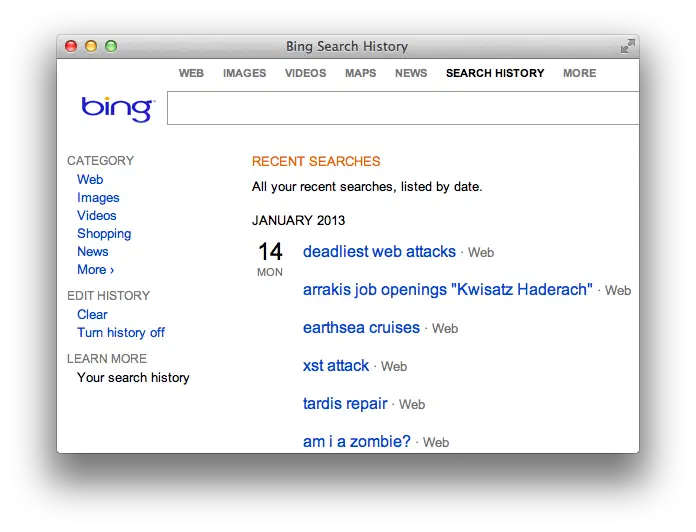
    Bing Search History CSRF

    As a thought experiment, expand this scenario from a search history "infection" to a social media status update, or changing an account's email address, or changing a password, or any other action that affects the victim's security or privacy.

    The key here is that CSRF requires full knowledge of the request's parameters in order to successfully forge one. That kind of forgery (as in faking a legitimate request) requires another article to better explore. For example, if you had to supply the old password in order to update a new password, then you wouldn't need a CSRF attack -- just log in with the known password. Or another example, imagine Bing randomly assigned a letter to users' search requests. One user's request might use a q parameter, whereas another user's request relies instead on an s parameter. If the parameter name didn't match the one assigned to the user, then Bing would reject the search request. The attacker would have to predict the parameter name. Or, if the sample space were small, fake each possible combination -- which would be only 26 letters in this imagined scenario.

    Crafty Crafting

    We'll end on the easier aspect of forgery (as in crafting). Browsers automatically load resources from the src attributes of elements like img, iframe, and script, as well as the href attribute of a link. If an action can be faked by a GET request, that's the easiest way to go.

    HTML5 gives us another nifty way to forge requests using Content Security Policy directives. We'll invert the expected usage of CSP by intentionally creating an element that violates a restriction. The following HTML defines a CSP rule that forbids src attributes (default-src 'none') and a destination for rule violations. The victim's browser must be lured to this page, either through social engineering or by placing it on a commonly-visited site that permits user-uploaded HTML.

    <!doctype html>
    <html>
    <head>
    <meta http-equiv="X-WebKit-CSP" content="default-src 'none'; report-uri https://www.bing.com/search?q=deadliest%20web%20attacks%20CSP" />
    </head>
    <body>
    <img alt="" src="/" />
    </body>
    </html>
    

    The report-uri creates a POST request to the link. Being able to generate a POST is highly attractive for CSRF attacks. However, the usefulness of this technique is hampered by the fact that it's not possible to add arbitrary name/value pairs to the POST data. The browser will percent-encode the values for the document-url and violated-directive parameters. Unless the browser incorrectly implements CSP reporting, it's a half-successful technique at best.

    POST /search?q=deadliest%20web%20attacks%20CSP HTTP/1.1
    Host: www.bing.com
    User-Agent: Mozilla/5.0 (Macintosh; Intel Mac OS X 10_8_2) AppleWebKit/536.26.17 (KHTML, like Gecko) Version/6.0.2 Safari/536.26.17
    Content-Length: 121
    Origin: null
    Content-Type: application/x-www-form-urlencoded
    Referer: https://web.site/HWA/ch3/bing_csp_report_uri.html
    Connection: keep-alive
    
    document-url=https%3A%2F%2Fweb.site%2FHWA%2Fch3%2Fbing_csp_report_uri.html&violated-directive=default-src+%27none%27
    

    There's far more to finding and exploiting CSRF vulns than covered here. We didn't mention risk, which in this example is low. There's questionable benefit to the attacker or detriment to the victim. Notice that you can even turn history off and the history feature is presented clearly rather than hidden in an obscure privacy setting.

    Nevertheless, this Bing example demonstrates the essential mechanics of an attack:

    • A site tracks per-user context.
    • A request is known to modify that context.
    • The request can be recreated by an attacker, i.e. parameter names and values are predictable.
    • The forged request can be placed on a page where the victim's browser encounters it.
    • The victim's browser submits the forged request and affects the user's context.

    Later on, we'll explore attacks that affect a user's security context and differentiate them from nuisance attacks or attacks with negligible impact to the user. We'll also examine the forging of requests, including challenges of creating GET and POST requests. Then explore ways to counter CSRF attacks.

    Until then, consider who your User Agent is really working for. It might not be who you expect.

    Finally, I'll leave you with this quote from Kurt Vonnegut in his introduction to Mother Night. I think it captures the essence of CSRF quite well.

    We are what we pretend to be, so we must be careful about what we pretend to be.
  • A Lesser XSS Attack Greater Than Your Regex Security Jan 14, 2013

    I know what you're thinking.

    "Did my regex block six XSS attacks or five?"

    You've got to ask yourself one question: "Do I feel lucky?"

    Well, do ya, punk?

    Maybe you read a few HTML injection (aka cross-site scripting) tutorials and think a regex can solve this problem. Let's revisit that thinking.

    Choose an Attack Vector

    Many web apps have a search feature. It's an ideal attack vector because a search box is expected to accept an arbitrary string and then display the search term along with any relevant results. That rendering of the search term -- arbitrary content from the user -- is a classic HTML injection scenario.

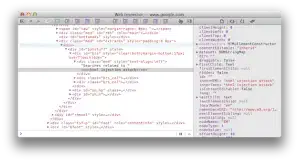
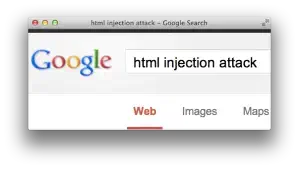
    For example, the following screenshot shows how Google reflects the search term "html injection attack" at the bottom of its results page and the HTML source that shows how it creates the text node to display the term.

    Google search Google search results Google search html source

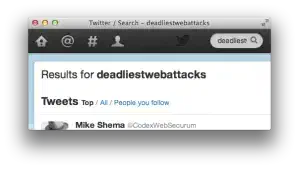
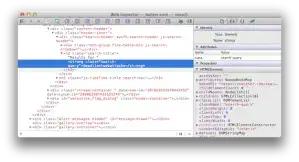
    Here's another example that shows how Twitter reflects the search term "deadliestwebattacks" in its results page and the text node it creates.

    Twitter search Twitter search html source

    Let's take a look at another site with a search box. Don't worry about the text. (It's a Turkish site. The words are basically "search" and "results"). First, we search for "foo" to check if the site echoes the term into the response's HTML. Success! It appears in two places: a title attribute and a text node.

    <a title="foo için Arama Sonuçları">Arama Sonuçları : "foo"</a>
    

    Next, we probe the page for tell-tale validation and output encoding weaknesses that indicate the potential for a vuln. We'll try a fake HTML tag, <foo/>.

    <a title="<foo/> için Arama Sonuçları">Arama Sonuçları : "<foo/>"</a>
    

    The site inserts the tag directly into the response. The <foo/> tag is meaningless for HTML, but the browser recognizes that it has the correct mark-up for a self-enclosed tag. Looking at the rendered version displayed by the browser confirms this:

    Arama Sonuçları : ""
    

    The <foo/> term isn't displayed because the browser interprets it as a tag. It creates a DOM node of <foo> as opposed to placing a literal <foo/> into the text node between <a> and </a>.

    Inject a Payload

    The next step is to find a tag with semantic meaning to the browser. An obvious choice is to try <script> as a search term since that's the containing element for JavaScript.

    <a title="<[removed]> için Arama Sonuçları">Arama Sonuçları : "<[removed]>"</a>
    

    The site's developers seem to be aware of the risk of writing raw <script> elements into search results. In the title attribute, they replaced the angle brackets with HTML entities and replaced "script"  with "[removed]".

    A persistent hacker would continue to probe the search box with different kinds of payloads. Since it seems impossible to execute JavaScript within a <script> element, we'll try JavaScript execution within the context of an element's event handler.

    Try Alternate Payloads

    Here's a payload that uses the onerror attribute of an <img> element to execute a function:

    <img src="x" onerror="alert(9)">
    

    We inject the new payload and inspect the page's response. We've completely lost the attributes, but the element was preserved:

    <a title="<img> için Arama Sonuçları">Arama Sonuçları : "<img>"</a>
    

    Let's tweak the. We condense it to a format that remains valid to the browser and HTML spec. This demonstrates an alternate syntax with the same semantic meaning.

    <img/src="x"onerror=alert(9)>
    
    HTML injection payload

    Unfortunately, the site stripped the onerror function the same way it did for the <script> tag.

    <a title="<img/src="x"on[removed]=alert(9)>">Arama Sonuçları :
        "<img/src="x"on[removed]=alert(9)>"</a>
    

    Additional testing indicates the site apparently does this for any of the onfoo event handlers.

    Refine the Payload

    We're not defeated yet. The fact that the site is looking for malicious content implies that it's relying on a deny list of regular expressions to block common attacks.

    Ah, how I love regexes. I love writing them, optimizing them, and breaking them. Regexes excel at pattern matching and fail miserably at parsing. That's bad since parsing is fundamental to working with HTML.

    Now, let's unleash a mighty regex bypass based on a trivial technique -- the greater than (>) symbol:

    <img/src="x>"onerror=alert(9)>
    
    HTML injection payload with anti-regex

    Look how the app handles this. We've successfully injected an <img> tag. The browser parses the element, but it fails to load the image called x> so it triggers the error handler, which pops up the alert.

    <a title="<img/src=">"onerror=alert(9)> için Arama Sonuçları">Arama Sonuçları :
        "<img/src="x>"onerror=alert(9)>"</a>
    
    alert(9)

    Why does this happen? I don't have first-hand knowledge of this specific regex, but I can guess at its intention.

    HTML tags start with the < character, followed by an alpha character, followed by zero or more attributes (with tokenization properties that create things name/value pairs), and close with the > character. It's likely the regex was only searching for on... handlers within the context of an element, i.e. between the start and end tokens of < and >. A > character inside an attribute value doesn't close the element.

    <tag attribute="x>" onevent=code>
    

    The browser's parsing model understood the quoted string was a value token. It correctly handled the state transitions between element start, element name, attribute name, attribute value, and so on. The parser consumed each character and interpreted it based on the context of its current state.

    The site's poorly-chosen regex didn't create a sophisticated enough state machine to handle the x> properly. (Regexes have their own internal state machines for pattern matching. I'm referring to the pattern's implied state machine for HTML.) It looked for a start token, then switched to consuming characters until it found an event handler or encountered an end token -- ignoring the possible interim states associated with tokenization based on spaces, attributes, or invalid markup.

    This was only a small step into the realm of HTML injection. For example, the site reflected the payload on the immediate response to the attack's request. In other scenarios the site might hold on to the payload and insert it into a different page. That would make it a persistent type of vuln because the attacker does not have to re-inject the payload each time the affected page is viewed.

    For example, lots of sites have phrases like, "Welcome back, Mike!", where they print your first name at the top of each page. If you told the site your name was <script>alert(9)</script>, then you'd have a persistent HTML injection exploit.

    Rethink Defense

    For developers:

    • When user-supplied data is placed in a web page, encode it for the appropriate context. For example, use percent-encoding (e.g. < becomes %3c) for an href attribute; use HTML entities (e.g. < becomes &lt;) for text nodes.
    • Prefer inclusion lists (match what you want to allow) to exclusion lists (predict what you think should be blocked).
    • Work with a consistent character encoding. Unpredictable transcoding between character sets makes it harder to ensure validation filters treat strings correctly.
    • Prefer parsing to pattern matching. However, pre-HTML5 parsing has its own pitfalls, such as browsers' inconsistent handling of whitespace within tag names. HTML5 codified explicit rules for acceptable markup.
    • If you use regexes, test them thoroughly. Sometimes a "dumb" regex is better than a "smart" one. In this case, a dumb regex would have just looked for any occurrence of "onerror" and rejected it.
    • Prefer to reject invalid input rather than massage it into something valid. This avoids a cuckoo-like attack where a single-pass filter would remove any occurrence of a script tag from a payload like <scr<script>ipt>, unintentionally creating a <script> tag.
    • Reject invalid character code points (and unexpected encoding) rather than substitute or strip characters. This prevents attacks like null-byte insertion, e.g. stripping null from <%00script> after performing the validation check, overlong UTF-8 encoding, e.g. %c0%bcscript%c0%bd, or Unicode encoding (when expecting UTF-8), e.g. %u003cscript%u003e.
    • Escape metacharacters correctly.

    For more examples of payloads that target different HTML contexts or employ different anti-regex techniques, check out the HTML Injection Quick Reference (HIQR). In particular, experiment with different payloads from the "Anti-regex patterns" at the bottom of Table 2.

    Page 71
  • TOCTOU Twins Dec 26, 2012

    Effective security boundaries require conclusive checks (data is or is not valid) with well-defined outcomes (access is or is not granted). Yet the passage between boundaries is fraught with danger. As the twin-faced Roman god Janus watched over doors and gates -- areas of transition -- so does the twin-faced demon of insecurity, TOCTOU, infiltrate web apps.

    This demon's two faces watch the state of data and resources within an app. They are named:

    • Time of check (TOC) -- When the data is inspected, such as whether an email address is well formed or text contains a <script> tag. Data received from the browser is considered "tainted" because a malicious user may have manipulated it. If the data passes a validation function, then the taint may be removed and the data permitted entry deeper into the app.
    • Time of use (TOU) -- When the app performs an operation with the data. For example, inserting it into a SQL statement or web page. Weaknesses occur when the app assumes the data has not changed since it was last checked. Vulns occur when the change relates to a security control.

    Boundaries protect web apps from vulns like unauthorized access and arbitrary code execution. They may be enforced by programming patterns like parameterized SQL statements that ensure data can't corrupt a query's grammar, or access controls that ensure a user has permission to view data.

    We see security boundaries when encountering invalid certs. The browser blocks the request with a dire warning of "bad things" might be happening, then asks the user if they want to continue anyway. (As browser boundaries go, that one's probably the most visible and least effective.)

    Ideally, security checks are robust enough to prevent malicious data from entering the app. But there are subtle problems to avoid in the time between when a resource is checked (TOC) and when the app uses that resource (TOU), specifically duration and transformation.

    One way to illustrate a problem in the duration of time between TOC and TOU is in an access control mechanism. User Alice has been granted admin access to a system on Monday. She logs in on Monday and keeps her session active. On Tuesday her access is revoked. But the security check for revoked access only occurs at login time. Since she maintained an active session, her admin rights remain valid.

    Another example would be bidding for an item. Alice has a set of tokens with which she can bid. The bidding algorithm requires users to have sufficient tokens before they may bid on an item. In this case, Alice starts off with enough tokens for a bid, but bids with a lower number than her total. The bid is accepted. Then, she bids again with an amount far beyond her total. But the app failed to check the second bid, having already seen that she has more than enough to cover her bid. Or, she could bid the same total on a different item. Now she's committed more than her total to two different items, which will be problematic if she wins both.

    In both cases, state information has changed between the TOC and TOU. The resource was not marked as newly tainted upon each change, which let the app assume the outcome of a previous check remained valid. You might apply a technical solution to the first problem: conduct the privilege check upon each use rather than first use (the privilege checks in the Unix sudo command can be configured as never, always, or first use within a specific duration). You might solve the second problem with a policy solution: punish users who fail to meet bids with fines or account suspension. One of the challenges of state transitions is that the app doesn't always have omniscient perception.

    Transformation of data between the TOC and TOU is another potential security weakness. A famous web-related example was the IIS "overlong UTF-8" vulnerability from 2000 -- it was successfully exploited by worms for months after Microsoft released patches.

    Web servers must be careful to restrict file access to the web document root. Otherwise, an attacker could use a directory traversal attack to gain unauthorized access to the file system. For example, the IIS vuln was exploited to reach cmd.exe when the app's pages were stored on the same volume as the Windows system32 directory. All the attacker needed to do was submit a URL like:

    https://iis.site/dir/..%c0%af..%c0%af..%c0%af../winnt/system32/cmd.exe?/c+dir+c:\\

    Normally, IIS knew enough to limit directory traversals to the document root. However, the %c0%af combination didn't appear to be a path separator. The security check was unaware of overlong UTF-8 encoding for a forward slash (/). Thus, IIS received the URL, accepted the path, decoded the characters, then served the resource.

    Unchecked data transformation also leads to HTML injection vulnerabilities when the app doesn't normalize data consistently upon input or encode it properly for output. For example, %22 is a perfectly safe encoding for an href value. But if the %22 is decoded and the href's value created with string concatenation, then it's a short step to busting the app's HTML. Normalization needs to be done carefully.

    TOCTOU problems are usually discussed in terms of file system race conditions, but there's no reason to limit the concept to file states. Reading source code can be as difficult as decoding Cocteau Twins lyrics. But you should still review your app for important state changes or data transformations and consider whether security controls are sufficient against attacks like input validation bypass, replay, or repudiation:

    • What happens between a security check and a state change?
    • How are concurrent read/writes handled for the resource? Is it a "global" resource that any thread, process, or parallel operation might act on?
    • How long does the resource live? Is it checked before each use or only on first use?
    • When is data considered tainted?
    • When is it considered safe?
    • When is it normalized?
    • When is it encoded?

    January was named after the Roman god Janus. As you look ahead to the new year, consider looking back at your code for the boundaries where a TOCTOU demon might be lurking.

  • BayThreat 2012 WebSocket Presentation Dec 8, 2012

    BayThreat held its 2012 conference this December in Sunnyvale, CA. Yes, I was sorely disappointed it wasn't actually in Sunnydale (with a 'd').

    My colleagues, @sshekyan and @tukharian, and I gave an overview on the security of WebSockets. The presentation slides are available now.

    Reading slides is always a hazardous approach to understanding a presentation. You may be completely lost because you don't have the benefit of background given during the talk, miss key points conveyed orally, or misunderstand comments. When a recording is available I'll add a link to it.

    In the meantime, here's a rough script for the introduction of the topic. (Usually I try to just jot down a handful of notes, but this post needed some more words. Keep in mind the intro is supposed to clock well under 10 minutes. It's brief by intent.)

    1 Hello, BayThreat. Hello, WebSockets.

    2 The length of time we have to cover WebSockets is about the same as a saturday morning cartoon from the 80s. So, we'll skip the commercial breaks and, kind of like Voltron, bring together a bunch of ideas and observations about this cool, new protocol.

    3 In the past, web apps have found many legitimate use cases for persistent connections and two-way communication. HTTP doesn't support this in any efficient or optimal way for continuous traffic. Trying to get this done with long polling, XHR, or DOM tricks are all workarounds, and like the plans of a cartoon villain (Skeletor, Hordak, Cobra Commander), they never seem to work like you want them to. (Mumra)

    4 That doesn't mean there aren't good techniques for two-way communication, they just aren't as good as they could be in terms of bandwidth or handling non-text data.

    HTML5 introduced Server-Sent Events to accommodate most long-polling scenarios in which the browser just needs to wait for incoming data. For example, stock quotes, tweets, or some other data for which the browser is a passive observer rather than an active participant.

    5 Which brings us to RFC 6455, WebSockets. It's a way to encapsulate almost any protocol on top of RFC 2616 (HTTP) without being as messy as RFC 1149.

    6 There are two major components to WebSockets. The communication protocol, which is designed to have low overhead and low complexity. And the JavaScript API, which is designed to be a simple interface for the browser. Send with the send() method, receive with the onmessage() method, and then just an open(), close(), and onerror() method to round out the object.

    7 So, let's take at look at how the browser sets up a WebSocket connection. First, it goes through a challenge-response handshake. The challenge is 128 random bits (that's a 16d8 for any role-players out there -- about 2 1/2 flamestrikes for you 1st ed. AD&D clerics).

    8 Next, the server responds. The response is a hash of the client's challenge plus a GUID defined by the RFC. The response also includes a "Connection: Upgrade" header so the two end points know to stop talking HTTP and start talking WebSockets. A while ago Carnegie Mellon & Google did a study with Chrome users and discovered that many proxies would strip that Connection header -- thus killing the handshake process. However, wss: connections (that is, WebSockets over SSL/TLS) were mostly immune to interference from proxies. So, not only will you create a more secure connection, you'll be more likely to create the connection in the first place.

    9 An important thing to understand about the handshake is that it proves the server speaks the protocol. That's it. It's not a cryptographic handshake to prove identity or trust. And another point, the handshake isn't supposed to start within mixed content. Also, the browser is supposed to limit pending connections to one per origin in order to prevent connection floods.

    10 Once the browser and server complete the handshake, they switch from HTTP to sending WebSocket data frames. A data frame's overhead can be as low as two bytes -- flags and a length. The maximum overhead is 14 bytes, so we're still talking an order of magnitude improvement over something like XHR or vanilla HTTP.

    Two notable parts of a data frame are the variable length fields and the mask.

    11 The length of a payload is indicated by 7, 16, or 64 bit values. A length is supposed to be represented by its shortest form. However, if you think of similar situations like overlong UTF-8 encoding you can imagine how variable-length fields might be a source of problems in terms of bypassing detection mechanisms or sneaking across security boundaries. And, of course, you have the potential for buffer abuse. You could submit a data frame that declares a few gigs of payload but only carries a few bytes. If you have a server that pre-allocates memory based on payload lengths alone (without, for example, even validating the frame), then it'd be an easy DoS. In other instances the server might experience a buffer over- or under-run.

    12 Data masking is an aspect of WebSockets that's transparent to the user. It's intended to prevent WebSockets from being a vector for cross-protocol attacks. For example, you wouldn't want WebSocket data to corrupt a proxy cache by impersonating HTML content, nor would you want a WebSocket to start spitting out EHLO commands to an SMTP server in order to spam the internet. (By the way, the handshake is also a countermeasure.)

    The browser applies a mask to all outgoing WebSocket frames. It's not encryption. The 32-bit "key" for the mask is included in the data frame. In other words, you're essentially sending the "decryption" key along with the message. The user isn't able to influence or access the mask from the JavaScript API.

    (As and aside, I created this figure with a dozen or so lines of a Scapy script; which speaks to how simple the protocol is to parse.)

    13 The browser controls a few other things that are kept out of view from the JavaScript API. It handles "ping" and "pong" frames for connection keep-alives. It's also supposed to limit the verbosity of error reporting to prevent WebSockets from being a better host or port "scanner" than previous techniques like using XHR or src attributes of img or iframe tags.

    14 Finally, remember that upgrading a connection from HTTP to WebSockets loses a certain amount of security context. The handshake itself carries information like Authentication headers, cookies, CORS, and the Origin header. However, you have to be careful about how you track and maintain this context after switching protocols. Imagine a simple chat application. It's one thing to have a session cookie identify a user's HTTP connection. But if your chat protocol relies solely on strings or JSON structures to identify the sender and recipient of messages, then it's probably a short step to spoofing messages unless you remember to enforce server-side controls on the user's state and chat interactions.

    With that groundwork out of the way, let's turn the channel to more educational programs on the security of WebSockets.

    ... end part I ...

    And with that we've exhausted the article. Keep an eye on this site for more updates on WebSocket security.

  • HIQR for the SPQR Dec 5, 2012

    Friends, Romans, coding devs, lend me your eyes. I've created an HTML Injection Quick Reference (HIQR). More details here.

    British Museum roman coin

    British Museum roman coin

    It's not in iambic pentameter, but there's a certain rhythm to the placement of quotation marks, less-than signs, and alert functions.

    For those unfamiliar with HTML injection (or cross-site scripting in the Latin Vulgate), it's a vuln that can be exploited to modify a web page in a way that changes the DOM or executes arbitrary JavaScript. In the worst cases, the app delivers malicious content to anyone who visits the infected page. Insecure string concatenation is the most common programming error that leads to this flaw.

    Imagine an app that allows users to include <img> tags in comments, perhaps to show off cute pictures of spiders. Thus, the app expects image elements whose src attribute points anywhere on the web. For example:

    <img src="https://web.site/image.png">
    

    If users were limited to nicely formed https links, all would be well in the world. (Sort of, there'd still be an issue of what content that link pointed to, whether obscene, copyrighted, malware, multi-GB images that would DoS browsers or sites they're sourced from, and so on. But those are threat models for a different day.)

    There's already trouble brewing in the form of javascript: schemes. For example, an attacker could inject arbitrary JavaScript into the page -- a dangerous situation considering it would be executing within the page's Same Origin Policy.

    <img src="javascript:alert(9)">
    

    Then there's the trouble with attributes. Even if the site restricted schemes to https: an uncreative hacker could simply add an inline event handler. For example:

    <img src="https://&" onerror="alert(9)">
    

    Now the attacker has two ways of executing JavaScript in their victim's browsers -- javascript: schemes and event handlers.

    There's more.

    Suppose the app writes anything the user submits into the web page. We'll even imagine that the app's developers have decided to enforce an https: scheme and the tag may only contain a src value. In an attempt to be more secure, the app writes the user's src value into an <img> element with no event handlers. This is where string concatenation rears its ugly, insecure head. For example, the hacker submits the following src attribute:

    https:">alert(9)
    

    The app drops this value into the src attribute and, presto!, a new element appears. Notice the two characters at the end of the line, ">, these were the intended end of the src attribute and <img> tag, which the attacker's payload subverted:

    <img src="https:">alert(9)>">
    

    A few more tweaks to the payload, such as creating some <script> tags, and the page is fully compromised.

    HTML injection attacks become increasingly complex depending on the context of where the payload is rendered, whether characters are affected by validation filters, whether regexes are used to deny malicious payloads, and how payloads are encoded before being placed on the page.

    SPQR (Senātus Populusque Rōmānus) was the Latin abbreviation used to refer to the collective citizens of the Roman empire. Read up on HTML injection and you'll become SPQH (Senātus Populusque Haxxor) soon enough.

    SPQR
1 ... 17 18 19 20 21 ... 26

Dangerous Errors

  • zombie
  • mutantzombie
  • mutantzombie.bsky.app
  • SecurityWeekly

Cybersecurity and more | © Mike Shema