Dangerous Errors
Podcast Posts Presentations Synthwave About
  • A Week of Security Should Last All Year Jul 24, 2017

    The summer conference constellation rises over Las Vegas for about one week every year. The trio of Black Hat, BSidesLV, and DEF CON historically generates loud, often muddled, concerns about personal device security. Sometimes the concern is expressed through hyperbole in order to point out flawed threat models. Sometimes it's based on ignorance tainted with misapplied knowledge. Either way, perform the rituals and incantations that make you feel better. Enjoy the conferences, have fun, share knowledge, learn new skills.

    Hubble Captures View of Mystic Mountain

    Whatever precautions you take, ask why they're necessary for one special week of the year. If the current state of security for devices and web sites can't handle that week, I find that a failure of infosec and an indictment of appsec's effectiveness after three decades.

    It's another way of asking why a device's current "default secure" is insufficient, or asking whether we need multi-page hardening guides vs. a default hardened configuration.

    Keep in mind there are people with security concerns all 52 weeks of the year. People who are women. People in minority groups. People in abusive relationships. People without political representation, let alone power. Most often these are people who can't buy a "burner phone" for one week to support their daily needs. Their typical day isn't the ambiguous threat of a hostile network. It's the direct threat from hostile actors -- those with physical access to their devices, or knowledge of their passwords, or possibly just knowledge of their existence. In each case they may be dealing with a threat who desires access to their identity, data, and accounts.

    There are a few steps anyone can take to improve their baseline security profile. However, these are just a starting point. They can change slightly depending on different security scenarios.

    (1) Turn on automatic updates.

    (2) Review authentication and authorization for all accounts.

    • Use a password manager to assign a unique password to every account.
    • Enable multi-factor authentication (MFA), aka two-factor authentication (2FA) or two-step verification (2SV), for all accounts that support it.
    • Prioritize enabing MFA for all accounts used for OAuth or social logins (e.g. Apple, Facebook, Google, LinkedIn).
    • Prefer WebAuthn authentication flows. It cryptographically binds credentials between the user device and server. This prevents replay attacks if the traffic is intercepted and reuse attacks if the server's credential store is compromised.
    • Review third-party app access (usually OAuth grants) and remove any that feel unnecessary or that have more permissions than desired.

    (3) Review MFA support (or activation factors as NIST 800-63B calls them)

    • Prefer factors that rely on FIDO2 hardware tokens, biometrics, or authenticator apps.
    • Only use factors based on SMS or email if no better option is available.
    • For authenticator apps, enable backups or multi-device support in order to preserve access in case of a lost device.
    • Record and save recovery codes associated with enabling MFA. Choose a storage mechanism sufficient for your needs, such as printed and placed somewhere safe or in a password-protected keychain.

    Talk to someone who isn't in infosec. Find out what their concerns. Help them translate those concerns into ways of protecting their accounts and data.

    Apple recently released Lockdown Mode in iOS 16, iPadOS 16, and macOS Ventura. It provides users with increased protection for their system by ensuring a secure default as well as disabling features that typically have security issues. It's effectively a one-click hardening guide and attack surface reduction. By disabling feeatures prone to abuse, it carries a useability cost. But ultimately it's an easy way for any user to have more security when they need it.

    Not everyone has an iPhone and not everyone has threats limited to account takeover.

    One resource with technical recommendations in non-technical jargon is Speak Up & Stay Safe(r).

    The EFF has a wide collection of practices and tools in its Surveillance Self-Defense guide. Notably, it lists different security scenarios you might find yourself in and how to adapt practices to each of them.

    The expectation for modern devices and modern web sites should be that they're safe to use, even on the hostile network of an infosec conference. If an industry can't create a safe environment for itself, why should it be relied on to create a safe environment for anyone else.

  • RVAsec 2017: Managing Crowdsourced Security Testing Jun 8, 2017

    This June at RVAsec 2017 I continued the discussion of metrics that reflect the effort spent on vuln discovery via crowdsourced models. It analyzes data from real-world bounty programs and pen tests in order to measure how time and money might both be invested wisely in finding vulns. Here are the slides for my presentation.

    We shouldn't chase a Sisyphean BugOps strategy where an app's security relies solely on fixing vulns found in production. We should be using vuln discovery as a feedback mechanism for improving DevOps processes and striving to automate ways to detect or prevent the flaws that manual analysis reveals.

    And when we must turn to manual analysis, we should understand the metrics that help determine when it's efficient, effective, and contributing to better appsec. This way we can being to model successful approaches within constrained budgets.

  • OWASP AppSec EU 2017 Presentation May 12, 2017
    Fire

    Here are the slides for my presentation at OWASP AppSec EU this year: The Flaws in Hordes, the Security in Crowds. It's an exploration of data from bug bounty programs and pen tests that offers ways to evaluate when a vuln discovery strategy is efficient or cost-effective.

    OWASP records the sessions. I'll post an update once video is available. In the meantime, keep an eye out here for more content that expands on the concepts in the presentation.

  • Crowdsourced Security -- The Good, the Bad, and the Ugly May 1, 2017

    In Sergio Leone’s epic three-hour western, The Good, the Bad, and the Ugly, the three main characters form shifting, uneasy alliances as they search for a cache of stolen gold. To quote Blondie (the Good), “Two hundred thousand dollars is a lot of money. We're gonna’ have to earn it.”

    Bug bounties have a lot of money. But you’re gonna’ have to earn it.

    And if you’re running a bounty program you’re gonna’ have to spend it.

    Cactus

    As appsec practitioners, our goal is to find vulns so we can fix them. We might share the same goal, just like those gunslingers, but we all have different motivations and different ways of getting there.

    We also have different ways of discovering vulns, from code reviews to code scanners to web scanners to pen tests to bounty programs. If we’re allocating a budget for detecting, preventing, and responding to vulns, we need some way of determining what each share should be. That’s just as challenging as figuring out how to split a cache of gold three ways.

    My presentation at Source Boston continues a discussion about how to evaluate whether a vuln discovery methodology is cost-effective and time-efficient. It covers metrics like the noise associated with unfiltered bug reports, strategies for reducing noise, keeping security testing in rhythm with DevOps efforts, and building collaborative alliances in order to ultimately reduce risk in an app.

    Eternally chasing bugs isn’t a security strategy. But we can use bugs as feedback loops to improve our DevOps processes to detect vulns earlier, make them harder to introduce, and minimize their impact on production apps.

    The American West is rife with mythology, and Sergio Leone’s films embrace it. Mythology gives us grand stories, sometimes it gives us insight into the quote-unquote, human condition. Other times it merely entertains or serves as a time capsule of well-intentioned, but terribly incorrect, thought.

    With metrics, we can examine particular infosec mythologies and our understanding or appreciation of them.

    With metrics, we can select and build different types of crowds, whether we’re aiming for a fistful of high-impact vulns from pen testing or merely plan to pay bounties for a few dollars more.

    After all, appsec budgets are a lot of money, you’re gonna’ have to earn it.

  • Start at Zero with the OWASP Top 10 Apr 24, 2017

    Engineering is an exercise in working within constraints. Appsec increases those constraints, forcing developers to better understand the nuances of vulns and then decide how to prioritize and fix them.

    Since 2003 the OWASP Top 10 has raised awareness of the types of weaknesses that plague web apps and the kinds of attacks that target them. Even trying to fit the abundance of attacks and weaknesses into a top ten list is an exercise in working within constraints. For their part, OWASP chose to label the entries as risks and refine the list by criticality.

    The recent update for 2017 proposes two new entries, both of which strive to capture complex subjects under the constraints of 2–3 words. The next two sections summarize these new entries, A7 and A10.

    A7. Insufficient Attack Protection

    Insufficient attack protection (A7) covers the concepts of protect, detect, and respond to attacks against an app. These concepts echo three of the five functions named in the NIST Cybersecurity Framework. It’s a heavily overloaded item whose subtext is about asset inventory (where are your legacy apps) and risk management (how much should you invest in security tools for your apps).

    Detection should be tied to response decisions and whether you actually care about that information or will take action on it. Log collection and monitoring has its place in standard DevOps practices for analysis and debugging of an app’s health. Adding “attack” alerts is only useful if you have a plan for reacting to them; otherwise they’re just noise and data that don’t convey information. There’s a distinction between traffic that has attack-like properties and traffic that is exploiting weaknesses in the app.

    What’s notable about A7 is that it calls out additional components like IDS, WAF, and RASP to add the app’s ecosystem. For legacy apps, these might make sense since their deployment can be more cost-effective than rewriting code. For other apps, this trade-off may not make sense. Again, we’ve returned to a risk management decision that requires context about the app.

    Also under this item’s description is the ability to patch quickly. This decision tree also branches between legacy apps and active apps. Legacy apps might benefit from WAF solutions whereas apps with active DevOps should have capabilities to deploy patches out of regular release cycles.

    A10. Underprotected APIs

    Underprotected APIs (A10) is an equally overloaded item, but more in the sense that it’s a reminder that the Top 10 items A1 through A9 apply equally to APIs. Modern web apps are often split between JavaScript-heavy frontends that interact with REST-based API backends via HTTP requests. Similar APIs may also serve native mobile apps, or be designed for other web apps to interact with.

    In other words, appsec applies to endpoints that serve more than just web browsers. Those API endpoints may still have authentication weaknesses, cross-site scripting issues, or other vulns. And security testing should cover them as well.

    Like A7, this relates to asset inventory (web-based APIs that aren’t for browsers are still web apps) and risk management (APIs need security testing, too).

    Start with Zero

    When we encounter constraints we must ask questions in order to make informed decisions. Both A7 and A10 have a basis in web asset inventory and risk management. This is like searching for the answers to, “What apps do I own, what weaknesses do they have, and how much effort should I put into them?”

    Another way to frame this is in the vein of the OWASP Top 10 might be as the following zeroth entry:

    A0. Under-developed risk classification

    The spirit of this entry is to equip your DevOps (or DevSecOps) team with the tools to describe the risk associated with the OWASP Top 10 entries, evaluate that risk, and prioritize ways to reduce it.

    Security testing will help answer the question about how much risk your app has now. There are many ways to do this, from code reviews to source code scanners to dynamic scanners to bug bounties and pen tests.

    For example, pen tests identify weaknessess and vulns within a web app or API. Experienced pen testers can also provide insight into the impact a vuln might have on the app, its data, or its users; and the likelihood (or ease) of that vuln’s exploitation. That information plus context about the app’s criticality to business operations or the revenue it supports all contribute to its risk.

    A DevOps team should strive to reduce risk over time by improving code, making design changes, increasing the speed at which patches can be deployed, or adding security tools like a WAF. By tracking risk over time, you can monitor trends and set goals to reduce risk by measurable amounts.

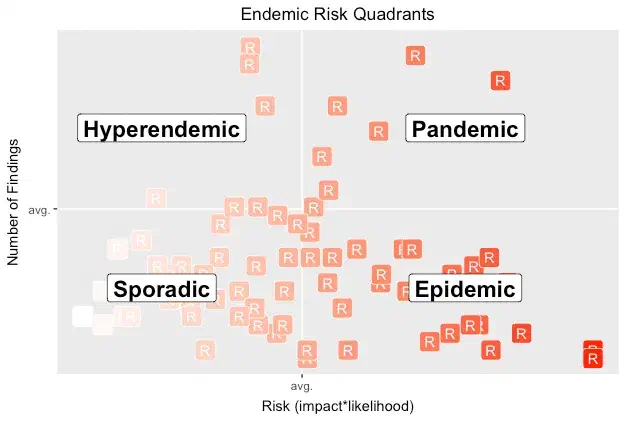
    Consistent classification and tracking also leads to insights about how an app compares with others. The following graph is an example of visualizing relative risk. It plots apps relative to each other based on their average risk and number of vulns. (Read this post to better understand this graph.)

    Tracking volume and risk of vulns

    We can’t build apps that are perfectly secure against all threats, but we can manage the risk they accrue from vulns and the attacks they face. Classifying and qualifying vulns helps teams work more effectively within the constraints of secure app development. It informs the way we answer questions like, “How much should I worry about this app and what’s the first step I should take to protect it?”

    Risk management, like app development, is a continuous process. The OWASP Top 10 gives DevOps teams a security reference. They can use it to classify vulns discovered by security testing, rate those vulns, and prioritze how to fix them — ideally improving deployment processes along the way.

1 ... 8 9 10 11 12 ... 26

Dangerous Errors

  • zombie
  • mutantzombie
  • mutantzombie.bsky.app
  • SecurityWeekly

Cybersecurity and more | © Mike Shema